
Enterprise Architecture
Your architecture, matched to the interfaces that actually run
Applications and data objects are well maintained in your EAM tool, but interfaces are the hardest part to keep current. The WHINT® Integration Cockpit discovers your interfaces automatically across all integration platforms and matches them with your EAM tool, such as SAP LeanIX, LUY, MEGA HOPEX or Bee360.
Architecture model and reality drift apart
Growing interface volumes, legacy middleware and hybrid architectures make integration landscapes complex. Planning a transformation needs reliable facts about real dependencies.
Today
- Interfaces captured manually in spreadsheets through questionnaires and workshops
- System names in integration and EAM don’t match
- Unclear which interfaces are still in use
- Documentation ages faster than it is maintained
With the WHINT® Integration Cockpit
- Interfaces discovered automatically and continuously
- Senders and receivers mapped to canonical system definitions
- Decommissioning insights reveal unused interfaces
- Interfaces linked to business processes and EAM
How it works
The WHINT® Integration Cockpit reads your integration layer, from SAP PI/PO and SAP Integration Suite to Azure, AWS, Kafka, Solace, Boomi and MuleSoft. It standardizes and harmonizes the data into one central inventory and feeds it to enterprise architecture and knowledge management. Project and development status is synchronized with the project backlog.
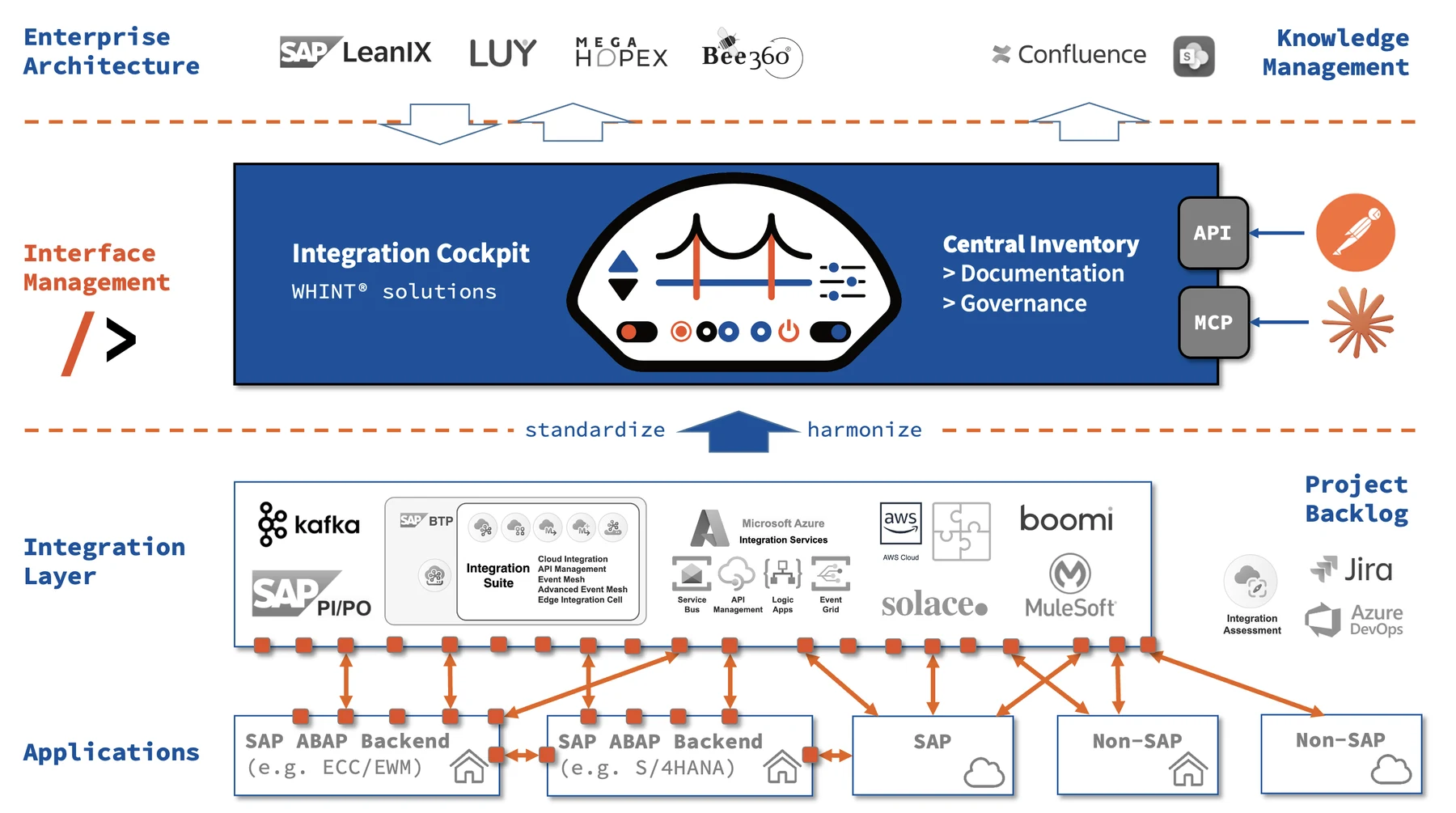
- DiscoverAutomatic interface discovery on every connected integration platform, SAP and non-SAP, cloud and on-premise.
- Standardize & harmonizeSender and receiver names are mapped to canonical system definitions using regex rules, building one central inventory.
- SynchronizeMatching with applications and data objects from your EAM tool, documentation into Confluence or SharePoint, project and development status synced with the backlog, e.g. Jira or Azure DevOps, access via API and MCP.
What enterprise architects gain
Real-time transparency
Full visibility across all interfaces for data-driven decisions in transformations and projects.
End-to-end data flows
Interface steps linked into traceable processes, e.g. API → CPI → IDoc.
Gap analysis
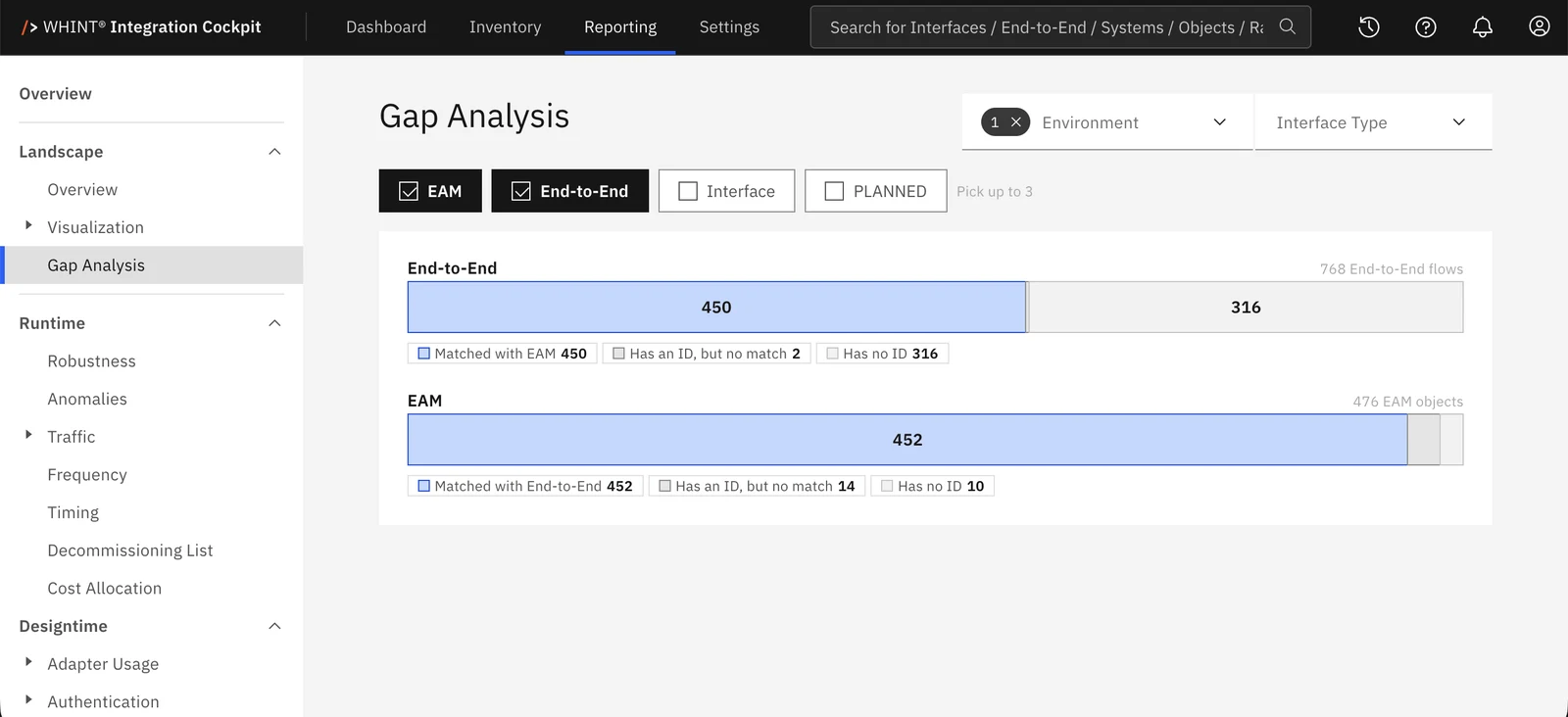
See at a glance which flows and EAM objects match, which have an ID but no match, and which have no ID at all.
Decommissioning insights
Find unused or outdated interfaces and retire legacy integrations safely.
Integration strategy fit
Validate adapter usage and authentication against your defined strategy.
Audit-ready documentation
Technical documentation auto-generated into Confluence or SharePoint.
WHINT® Integration Cockpit or interface discovery in SAP LeanIX?
SAP LeanIX can detect integration flows between SAP systems via SAP Cloud ALM. That is a good start as long as your landscape is purely SAP. For hybrid landscapes, the WHINT® Integration Cockpit delivers much more.
| SAP LeanIX via SAP Cloud ALM | WHINT® Integration Cockpit | |
|---|---|---|
| Data source | Integration & Exception Monitoring in SAP Cloud ALM | Directly from the integration platforms |
| Coverage | Integration flows between SAP systems | SAP and non-SAP: SAP PI/PO, SAP Integration Suite, Azure Integration Services, AWS, Kafka, Solace, Boomi, MuleSoft |
| Prerequisites | SAP Cloud ALM with landscape management and monitoring set up. Landscape discovery currently covers cloud services only, on-premise is planned | Connection to your integration platforms, cloud and on-premise |
| Depth of information | A detected flow between two systems | Design time (mappings, scripts, adapters, authentication, versions) and runtime (traffic, errors, performance) |
| End-to-end view | Flow between sender and receiver system | Chained steps across platform boundaries, e.g. API → CPI → IDoc |
| Matching with EAM | Detected flows land in an inbox and are created or linked as fact sheets manually | Harmonization via regex rules and gap analysis: matched, ID without match, no ID |
| EAM tools | SAP LeanIX | SAP LeanIX, LUY, MEGA HOPEX, Bee360 |
| Beyond that | – | Governance checks, decommissioning insights, cost allocation, documentation into Confluence/SharePoint, access via API and MCP |
Sources on SAP LeanIX: SAP LeanIX announcement „Discovered Flows“ · SAP Landscape Discovery docs